RHEL Disk Order Problem on VMware vSphere
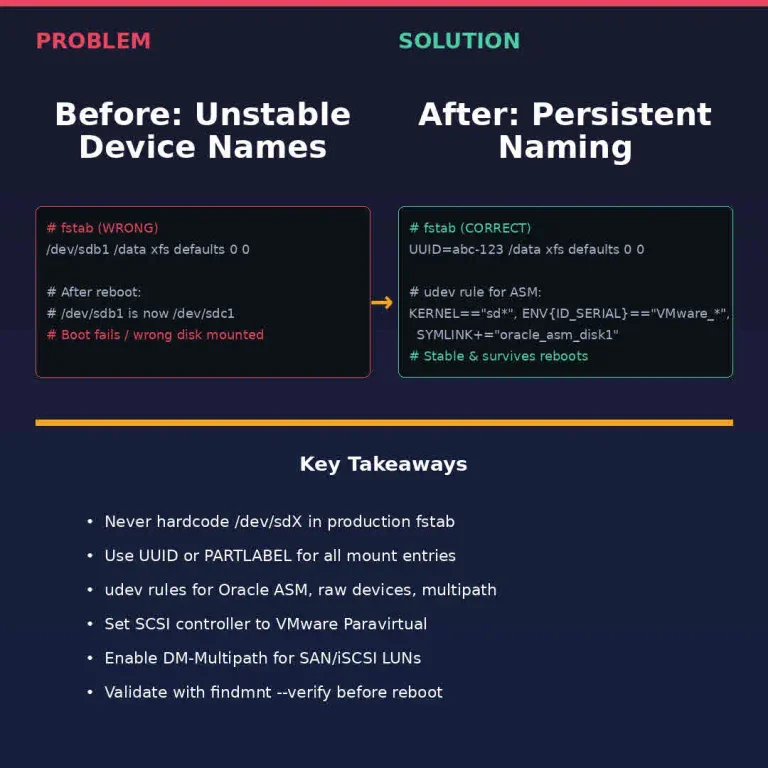
I've been running RHEL on VMware vSphere since ESXi 5.5 in my lab—nested labs, customer environments, production clusters. And there's one gremlin that keeps biting engineers even in 2026: the RHEL disk order problem. You build a VM, attach a few VMDKs, configure your application, reboot, and suddenly /dev/sdb is /dev/sdc. Your database mounts the wrong disk. Oracle ASM can't find its disks. Apache serves files from a stale path. This is not a bug. It's how Linux has always assigned block device names—by enumeration order during kernel boot. But on vSphere the RHEL disk order problem turns acute because VMware's SCSI controller re-presents disks in scan order that can shift between power cycles.
vCenter Server Simulator Ultimate Guide

vCenter Server Simulator VCSIM guide featured banner

If you are still spinning up massive, nested ESXi environments just to test a basic PowerCLI script, a Python vSphere API wrapper, or a custom Terraform provider, you are wasting compute. Marketing teams want you to buy more hardware for dev environments; engineering reality dictates we simulate. Enter VCSIM (vCenter Server Simulator) —the lightweight vCenter simulator that boots in milliseconds instead of hours.

VMware Cloud Foundation 9.1: What Actually Changed

Broadcom shipped VMware Cloud Foundation 9.1 in May 2026. The marketing says “AI-ready private cloud.” The release notes tell a different story — one about operational maturity finally catching up to the platform’s ambition.

I’ve been running VMware Cloud Foundation since the 3.x days. This is the first release where the day-2 operations story feels complete. Not perfect. Complete.